Showing posts with label Microsoft. Show all posts

Sunday, 8 September 2019

Ofcom's media nations report: Bar chart epic fail

As a designer of interactive visualisations you have great power and great responsibility to stop the user from doing stupid things. Whoever put Ofcom's media nations report together on Power BI, left the option to the user to tick plotting the responses to multiple questions, with the percentages going well above 100%. I'm not familiar enough with Power BI to know if this is the fault of the software rather than the designer.
And the magic setting producing the magic plot (one of the questions only has answers for 2018-2019

Tuesday, 25 December 2018

Managing the monthly Flow allocation using a scheduled ftp file grab

Running a flow for every new file in the FTP repository is eating away my monthly allowance
Therefore since I'm not interested in real time monitoring, a more efficient approach is to only fetch files once a day. Note that the ftp directory list gives a body on which we can run a 'foreach' loop, to then only select the wanted files whose filenames satisfy the condition.
If you got this far, Merry Xmas!!!

Sunday, 23 December 2018

FTP fetching and maintaining filename with Microsoft Flow

In previous posts I looked at grabbing web content with microsoft flow on a scheduled trigger, and triggering similar website grabs from RSS feeds. A more old fashioned scenario involves downloading files from an FTP server. In that case the content already exists in the form of a file and has a filename, so there is no need to 'construct' a unique filename, we can simply name it in the same way that it is named on the server. On the other hand, this can be seen as an advantage over traditional ftp clients in that we can actually rename our files based on our own convention rather than be forced to keep the original filenames.
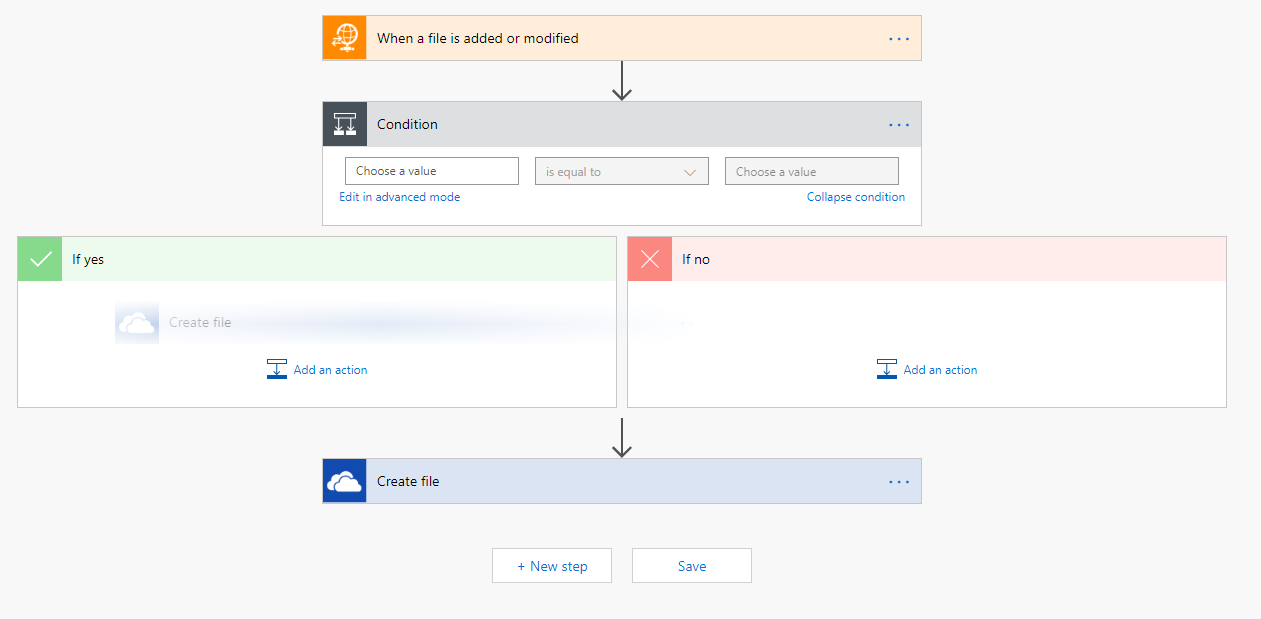
Finally, having changed my mind about downloading all files and wanting to introduce a condition, I find that I was wrong in my previous post, I can drag and drop the create file component inside the 'yes' outcome of the condition.


Sunday, 16 December 2018

Conditionals in Microsoft Flow for RSS feed processing

For the Flow aficionados amongst you, check out the Flow online conference videos on YouTube.
 
I've referred to the golden age of web 2.0 in Yahoo! in a previous post. One of the cool products of that time was Yahoo! Pipes that provided effectively pipework for RSS feeds. 

With similar applications in mind, Microsoft flow can be a worthy replacement. I needed to only retrieve the web page linked from an RSS feed if the title contains a particular keyword. See the screenshot below. The flow web editor does not allow for dragging and dropping an action into the alternative paths following the conditional. I guess this will be a possibility when editing Flows in Visio becomes available. This might look like a peculiar combination to those of us who think of Visio as a tool for drawing diagrams, but Visio already has Sharepoint workflow functionality, and Microsoft Flow is to replace Sharepoint workflows as you'll hear in the conference videos.


Monday, 10 December 2018

Using Excel to turn XML format data into a table

Back in the early noughties when I was trying to learn a bit about web development, XML was all the rage. These days it has been displaced in various applications by json and other formats. Configs, that should have been safe XML territory, are also threatened by json, with Microsoft Flow being an example of such use of json. Even so, a number of legacy uses of XML are still going and it is worth being able to decipher it.

Of course you could simply open an XML file in an editor and do lots of manual editing to turn it into csv. At the other end of the spectrum, scripting languages are good at parsing this format. I have found the Python XML Element Tree library useful for that.

A middle road exists, which is to simply drag and drop the file on Excel. This functionality is hardly surprising given that the excel file format itself is based on XML. Using this example data: http://dxlite.g7vjr.org/?band=vhf&limit=500&xml=1
Ignore the style pop up question, then you get a few options:
and finally a warning about schema.
Sticking with all the defaults results in the desired table in excel
Things of course will be more complicated with more complicated XML data, and it will be worth looking at the file in an editor, and considering using a proper script to convert it. But excel can be a useful quick and dirty solution.

Saturday, 8 December 2018

Fixing the flaws of Flow

In a previous post I complained about Flow not being able to compress files on the go. The issue with that was that as my files were not stored locally by default, once I started the archiving process with 7zip it would first cause the download of the file locally, then add it to the archive. Often with a flaky network something would disrupt the download, which would then mess up with the archive. The workaround has been to specify that all the files in that folder are stored locally, thus decoupling the download from the archiving.

I know, not something to write home about. Let's look at the config of the HTTP component in more detail. Oops! There is an automatic decompression button set to 'On' by default! Make sure it's off unless you really want decompression.

As I had a few failed runs, I've changed the retry policy, from the exponential default starting with an interval of seconds, to a fixed interval with quite a few minutes interval. I find this works better for a website that has gone temporarily down, especially given that I don't particularly want the flow to be responding in real time. The fact that this can be done from inside the config rather than by adding more steps to the flow is something I learned from the great Serge Luca in his Sharepoint Saturday presentation.

Saturday, 18 August 2018

The flaws of Flow: Can't zip downloaded files

Microsoft Flow has been proving more useful in my Office 365 dominated environment. I've been using the FTP connector to download masses of files to my OneDrive. The OneDrive comes with a 1 TB limit, which is plenty but it is worth trying to keep things compact. Unfortunately, while flow can extract from zipped archives, it can't do the opposite. In order to manually create a zipped archive, the computer downloads all the files, zips them and uploads them back to OneDrive. Gotta love Microsoft!

Sunday, 29 July 2018

Microsoft flow as a last resort in place of cron and windows scheduler

You know the situation: while you are not the biggest fan of MS out there, your employer's IT department are. Of course you don't really have proper access to a Linux system to set up a cronjob to do your data fetching for you, and you don't even have an 'always on' windows machine to be able to do this via Task Scheduler.

Well, you have to make do with what you have, and in this case, that is Office 365, a lesser known component of it called Flow. There is an upside to this to rescue your pride somewhat: while it is a humble office app it uses the same language as azure logic apps, so think of it as cloud training!