Showing posts with label maps. Show all posts

Friday, 9 August 2019

Extracting the list of coordinates for geographic role 'airport' out of Tableau

Don't they say a picture is a thousand words? All you have to do is navigate to 
C:\Program Files\Tableau\Tableau Public 2019.2\local\data
(modify appropriately for Tableau desktop). Copy the airport tableau source and the GEOCODING database into another folder, drag and drop the tds on tableau and voila, you have the airports and their coordinates! You can even export them to csv for general purpose use.


Friday, 24 August 2018

Unknown region breaks map in Blogger's Audience stats

Blogging is all about vanity in the end, and to flatter ourselves we check on the audience stats provided by Blogger from time to time. Today I notice something rather peculiar: as I fiddle with the time-span (day, week, month) I notice that the maps works fine when it knows the countries in question.
But lately 'unknown region' has been showing up, and that seems to destroy the map altogether, so no country is coloured anymore. Tableau would have happily warned me of one null while still colouring all other countries.

Tuesday, 17 July 2018

Using Post code Sector GeoJson from TableauMapping.bi

Ok, so this time I'm using https://www.tableaumapping.bi/ properly. I connect using the web connector from tableau Public to https://www.tableaumapping.bi/wdc and chose the Post code Sector table. I then blend in my own data with post code addresses. I use a calculated field to generate the sector from the full post code in my data:
left([postcode],len([postcode])-2) 
and voila! a much more detailed map than the one I got before using only the first half of the postcode.

Strange maps courtesy of Tableau mapping BI

While fooling around with the otherwise worthwhile https://www.tableaumapping.bi website last night, I managed to get it into a state producing some rather interesting maps. The one below shows the UK ceremonial counties trampling over Iceland (cod wars all over again!). 
Another one shows the Bristol channel housing the whole of the EU and a few fellow travellers broken down to NUTS 2!
I'm having trouble reproducing the behaviour today, they might have fixed it!

Saturday, 7 July 2018

Splitting the prefix out of a british postcode with no spaces

I came across a dataset this week that had postcodes in this format
Tableau only understands the first half of the postcode, but how do we split it out? Wikipedia as always has a fairly comprehensive description: The outward code (i.e first half) can be from 2 to four characters, but the inward code (second half) is always three characters. Therefore we can isolate the outward code with a calculation:
left([Post Code],len([Post Code])-3)
This now gives the outward code alone in a field that can be given a post code geographic role and  used with the filled map mark type.
And if you do spatial analysis, that little anomaly on the river Thames would have caught your attention. Lets add place names and streets in the map layers and zoom in:

Friday, 1 June 2018

Layering filled maps and polygons on map (2018.1 update)

I wrote about this technique more than a year ago and it was one of my more popular posts, thanks to a tweet by zen master Chris Love. It is time to update the particular example as version 2018.1 finally brings generated Latitude and Longitude closer to Latitude and Longitude already in the dataset.

We start by UNIONing our two sources, the polygon source having latitude and longitude, the mark source having a field that can be interpreted as a filled map.

 We then use the new trick of putting generated latitude and longitude on the axis, with source latitude longitude in the level of detail for the polygon layer. In the past I would import the filled map source, generate the latitudes longitudes, export crosstab to excel, save as csv, and do a union with the polygon csv. No longer necessary as of 2018.1.
Now all that is required is dual axis to overlay the polygon over the filled map.

Tuesday, 29 May 2018

Labelling polygons that go across the prime meridian and its antimeridian


Consider a dataset describing polygons like the one below:

lat lon path polygons
1 1 1 1
-1 1 2 1
-1 -1 3 1
1 -1 4 1
1 1 5 1
1 179 1 2
-1 179 2 2
-1 -179 3 2
1 -179 4 2
1 179 5 2

Tableau doesn't allow you to label polygons directly, therefore the work around is to do dual axis on either latitude or longitude, and create a second layer using the average latitude and longitude of all the vertices of the polygon (key detail, remove the path from the level of detail, while you need it there for the polygon layer) to place the label. 

This works fine apart from any polygons that include points on either side of the antimeridian at 180 degrees longitude, using the convention of 0 to 180 for longitude east, and 0 to -180 for longitude west. The trick here is to detect if the maximum and minimum longitude have different signs and if difference between the maximum and the minimum longitude defines an angle smaller or greater than 180 degrees. In the latter case, the longitude convention needs to be changed to 0 to 360 for the averaging to give sensible results. To achieve that we create a calculated field as shown below and use it in place of the longitude.

if max([Lon])*min([Lon])<0 then
if max([Lon])-min([Lon])>180 then avg(if [Lon]<0 then 360+[Lon] else [Lon] end)
else avg([Lon]) end
else avg([Lon])
end

Friday, 4 May 2018

BBC News website Carto election map epic fail

Meanwhile, in the land where elections happen on Thursdays, this is what happens to the public broadcaster website on the day after!


Sunday, 20 August 2017

Tableau and negative zero

Another saga from the big data frontier: at work we have a source of GPS data, and I've been working with a colleague to aggregate it to a degree grid, not unlike the example linked. The data is in hive, and bizarrely it has two columns for each dimension, latitude magnitude as a positive float, and latitude sense as a string (N or S) etc. for longitude. To make our life simple we round the magnitude in the custom SQL that connects to hive, and we make the data signed again with a simple calculation in the Tableau source:
[round Latitude magnitude]*
(case [latitude sense]when 'S' then -1
when 'N' then 1
end)
The rounding of the magnitude is fine as we also keep the sense in the group by dimensions in the custom SQL. The only special case here is when the rounded magnitude is zero, where had we done the sign assignment before the rounding, we'd have one bucket for zero instead of one for 0-0.5 and one for -0.5-0. But surely that shouldn't be an issue once we do the calculation above in tableau?

It turns out that it is an issue. I'm not sure what's happening in the data engine (two's complement going crazy because of negative zero?) but the two zeros are treated differently, recreated with the data of the post linked above.
 Sure enough, looking at the two zeros there's one for -0 and one for +0. So we refine our calculation to avoid multiplying zero by -1

if [round Longitude magnitude]=0 then 0 else
[round Longitude magnitude]*
(case [longitude sense]
when 'W' then -1
when 'E' then 1
end)
end 

Monday, 8 May 2017

It's the economy, stupid!

So I was listening to my BBC local station yesterday. Have you noticed how rather mediocre radio stations make a bit of an extra effort in their weekend programming? Normally this involves some specialist music shows, but BBC Cambridgeshire also has the Naked Scientists . One of the themes of the evening was language, and one of the featured scientists (hopefully not naked) was the economist Keith Chen. The fact he is not a linguistics professor is a crucial thing to note, as well as the fact that he teaches in the school of management and not in the economics department. But I digress.

Keith Chen's main point was that people speaking a language that has an explicit future tense (such as English or Greek) don't save as much money, don't take as much care of their health etc. compared to speakers of languages that don't have a future tense (aparently German is such a language). For the nuanced argument you can read the relevant paper which I have only skimmed through but hey, this is a blog, we don't take ourselves too seriously.

One of his main sources of data is the world values survey. The first thing I notice on visiting their site is the beautiful magic quadrant visualisation known as the Inglehart–Welzel Cultural Map, or occasionally the Welzel-Inglehart Cultural Map. This immediately screams 'Samuel Huntington Clash of civilisations' to me, but I haven't read that book either so I won't get carried away. Just notice how countries are bundled together in mysterious ways: Azerbaijan occasionally becomes orthodox, Israel and Greece catholic, the English speakers are of course exceptionally neither protestant nor catholic even though they could be either or neither, and the colouring does or doesn't always follow the religion, or the cluster, which contorts around accordingly.


So this wonderful source of data proves that future tense equipped languages like the ones mentioned above have speakers that don't plan for the future, and vice versa. The examples quoted included of course the UK and Greece as the worst savers in Europe. This tempted me to use the website facilities to get the table embedded below: 

TOTALCountry Code
CyprusGermany
Save money42.8%13.9%57.0%
Just get by38.4%66.3%24.7%
Spent some savings and borrowed money9.1%12.2%7.6%
Spent savings and borrowed money6.6%5.8%7.1%
DE,SE:Inapplicable ; RU:Inappropriate response; BH: Missing; HT: Dropped out survey0.2%-0.3%
No answer1.7%-2.6%
Don´t know1.1%1.9%0.8%
(N)(3,046)(1,000)(2,046)
To me this data says one thing: People in Germany were well off at the time of the survey, and people in Cyprus were much less well off. When you have money to spare, you save, when you don't you get by, and that has little to do with your language and the way it expresses future events. It has a lot more to do with employment going up or down, banks doing well or being about to collapse, and the euro being too strong or too weak in relation to the country's economic health. In fact Chen went as far as citing Belgium, as an example of where everything else being the same, language is the only factor differentiating people. Perhaps he should check out some call record analysis proving that Belgium is really two parallel societies that meet in Brussels!

I was planning to finish on a note about the sad state of linguistic research but it would be wrong, actually the fact he is in the management school explains the unique blend of positivist prejudice displayed here.

Sunday, 19 March 2017

EU data protection compliance

As promised here's a look at where the data protection compliant countries lie on the map. The geospatial insight? They could be anywhere in the world, unless they are a tiny island state/dependency in which case they have to be within about 10 degrees east or west of the Greenwich meridian!


Wednesday, 15 March 2017

Big Data World day 1 review

This event was today at Excel in London. It is handily co-located with Cloud and Smart IoT events, which was a major draw for me, as I am not strictly speaking a data/IT guy, more of an analyst and wannabe subject matter expert with IoT and increasingly cloud within my professional interests. As the write up is quite long the following list of links lets you jump to the summary of the relevant presentation:


I did start from the Cloud Expo end of the room as there was a whole 'theatre' devoted to talks on software defined networks. Judging from the first presentation which looked at SD-WANs, these guarantee the exact opposite of net neutrality to business users, prioritising cloud business applications at the expense of e.g. YouTube traffic. The technology involves 'aggregating and orchestrating' a variety of links of varying performance and availability from MPLS and 3G to old school internet, and intelligent path control for different applications' traffic, e.g. routing VoIP traffic through MPLS, thus being able to guarantee QoS above 'best effort'. Interesting ideas on SLAs for application uptime and even application performance could extend the current SLAs of network availability. To my simplistic brain, it would all be simpler and safer if we keep most applications offline and standalone, instead of putting everything on the cloud, but there's a cloud enabled industrial revolution in progress, which involves cost cutting and getting rid of half the IT department. Clearly that is the main driver, with the downside being increasing demands on the network.

In complete contrast, I moved on to a presentation in the Big Data World area on the General Data Protection Regulation. This made me feel suddenly quite nostalgic for the good old EU, its much maligned courts and the human right to a private life. The list of non EU countries that conform  to european data protection standards is interesting to say the least: Andorra, Argentina, Canada, Faeroe Islands, Guernsey, Israel, Isle of Man, Jersey, New Zealand, Switzerland and Uruguay. Maybe there's material there for a tableau map and some spatial insights!

Next was SelectStar, a database monitoring solution. Their main selling point is being a single monitoring tool for all database technologies, as increasingly companies will have a mixture of open source and proprietary relational and NoSQL solutions, rather than be an e.g. 'all Oracle' house. I was hoping to get some tips on actual monitoring of the health of a Hadoop cluster, but they don't do much in addition to what the built in Hadoop monitoring tools offer, in fact Hadoop is quite a recent addition to their offerings.

I try and balance attending presentations relevant to my job to things that are just plain interesting. In the spirit of the latter, I went to the 'deep learning' keynote, which as one member of the audience noted, was using mostly image recognition examples. The presenter explained that they make good presentation material, and the technique has wider applications. The key thing I took from this was that the feature extraction is now also 'trainable', whereas in old school machine learning only the classification stage was. I'm not fully convinced machines are better than humans at deciding what the best feature vector is, and I should read up on any speech/music processing applications of this as I have a better theoretical grounding in that field. Would a machine ever come up with something as brilliant but crazy as the cepstrum?

I next attended a talk on deriving 'actionable insight' from data. This is now such a cliche that is a bit meaningless, especially when the whole brigade of viz whizz kids are into dashboard visualisations with little accompanying text, carrying little of the insight a well illustrated text heavy report will give you. Refreshingly, and perhaps tellingly on the differing priorities of the private and public sector data world, the speaker used no visual material whatsoever. He just talked about his work as a data analyst for Peterborough city council, and projects such as identifying unregistered rental properties by fusing a variety of datasets including council tax and library user details, or analysing crime patterns! I should look into what open data offerings they have.

The weather company, finally a (nearly) household name, was next, in a keynote on weather for business. They interestingly crowdsource some of their data to achieve 'hyperlocal' resolution of 500m, 96 times a day globally, while a major sector of their corporate customers, airlines, are also data providers.  They have a unique data processing platform and the speaker did put a certain emphasis on their acquisition by IBM and the 'insights and cognition' synergies that will result from it.

I then ventured into the Smart IoT area for a talk from O2/Telefónica. The data protection theme was present here again as they make sure their data is secure and anonymous via aggregation and extrapolation, and a certain amount of weeding out of any data that is not aggregated enough and therefore could be used to identify individual users, and users consenting to the use of their data also came up during question time. They derive location via both 'active' (calls) and 'passive' (cell handovers) means, as well as behavioural data from apps and websites visited, and 'in venue' information from their wifi hotspots and small cells (another hint at the seamless integration of multiple networks mentioned earlier). This builds up to 6 billion events on a typical day, and they keep an archive of 4 years. These events are classified into 'settles' and 'journeys', analysed to identify origins and destinations, with uses ranging from transport planning, audience profiling, retail decision making etc.

Back to the other end of the hall to hear self professed ubergeek Andi Mann of Splunk on DevOps . Follow the link as he can summarise his ideas much better than I can. He gave me another interesting fact on Yahoo's past as a cool tech parent company, despite today's headlines on security breaches: the presentation on dev and ops cooperation at Flickr that was key to starting the devops conversation back in 2009. I think the idea of devops has applications outside software, in fact a lot of the operational intelligence work I do sits somewhere between operations and product/service development.

I did skip the QlikView presentation for the sake of Splunk, but came back to the Big Data keynotes for Esri. Their presentation focused on the benefits of spatial analysis, giving the grid aggregation I wrote about in the past as an example, along with navigation, fraud transaction detection and even insurance for ships going into pirate infested waters!

Finally a joint act between Wejo and Talend on their connected car project. This was interesting for many reasons, from the technologies involved on the car such as eCall  to the technology used for data processing, as Talend offers an open source ETL tool that can sit on top of Spark. On that latter front there was a certain emphasis on the benefits of having a unified infrastructure for batch processing and streaming, and a mention of the Apache Beam project as something Talend will support in the future to that end.

In the time left between all this I got to talk to some of the exhibitors. The most intriguing one was a Belgian company who make Anatella, which would catch the eye of anyone working in telecoms for their binary CDR processing capability. The demos included some fascinating social network graph analysis derived from phone calls: e.g. flemish speaking belgians tend to call other flemish speaking belgians and french speaking belgians tend to call other french speaking belgians, with the exception of Brussels, which proves to be bilingual territory not only in constitutional theory but also in telephony practice! There was a news story a few years ago on similar telephone 'connections' between UK regions, I remember Wales being split in three north to south, with more contact with the corresponding adjacent english region to the east than the rest of wales north and/or south. Fascinating work that can escape the narrow confines of marketing into proper Geography research, not unlike the work of the Flowminder Foundation that I link to on the right.

Friday, 10 March 2017

The chimney map

As this blog is among other things about maps, here's a fascinating documentary on a very old map found in Scotland and restored at the national library of Scotland.

Sunday, 26 February 2017

Layering marks and polygons on map

This is a trick that has become much simpler to perform since the introduction of union in Tableau 9.3.

We start with two data files, one with the vertices of our polygons and another with the locations where we want the marks. We create a union of those two when we create our tableau data source.
the wildcard union is particularly handy for multiple files so keep it in mind, in this case we don't really need it. What we then need to do is select the Latitude and the lat columns, right click and select 'Merge mismatched fields', likewise for the longitudes.

Then we can create our map with these merged latitudes and longitudes, but we really want to create two maps, one for each layer. Here's how to create the marks map:
Beware of the averaged coordinates, if you don't put all the dimensions in the level of detail you might not get a mark for each row in your dataset! And here's how to create the polygon:

Now we need to select dual axis and right click and hide the 'Null' location.This will give us the desired two layer map.

As it happens, my marks are the centroids of post-codes. So we can tell tableau that through the geographic role of the location field, and select filled maps as the type of mark to get the postcode polygon instead of the dot at the centroid. Note that the (generated) Latitude and Longitude is no good for this as it is not visible when editing the source and cannot be merged with the mismatched latitude longitude of the polygon source after the union, they can't even be used in calculated fields which could be another way round (the pre-9.3 way of doing things). So an original text only source might have to be imported into tableau and the generated coordinates will have to be copied to a new source to use for a union.


Friday, 24 February 2017

Alternative maps

Don't get me wrong. I don't read defense magazines. The extracts below are from the Radio User magazine, that I used to get both from a professional interest in maritime and aero communications and a hobby interest in shortwave and medium wave listening ( DX-ing). It is an excellent source of information on ADS-B and AIS as well as general search and rescue and safety comms, and of course long distance broadcasting and propagation conditions.

It does however also cater for plane spotters and scanner enthusiast following military exercises, hence the 'alternative' map of Scandinavia below. The description of the made up fringe country between Norway and Iceland is hilarious, any similarities to Brexit island are purely coincidental


The challenge as always of course is how to re-make the map in Tableau. To make my life easier I'm ignoring the made up internal borders inside Sweden and Finland, and focusing on relocating New Zealand to the North Atlantic.

Lets start with a dataset listing the necessary countries. Tableau is very good at mapping them in their usual locations.


But how do we move New Zealand? Let's have a go extracting the generated coordinates and fiddling with the numbers. We select the countries on the map, view the data and it's a rare case that the summary has more info (generated coordinates) than the full data. Select everything and copy into the csv creator of choise, any spreadsheet application will do.

Now move New Zealand to its 'alternative' position, lets say 60N 5W, remove the (generated) from the header, save the csv and re-import into Tableau.If you put the new coordinates on X and Y you get dots at the right places. But change to a filled map and New Zealand stubbornly refuses to move from the Pacific to the Atlantic.

Ok so clearly Tableau is doing things behind the scenes. Of course it has to as we haven't specified the relative size of the countries. Let's do that by adding the area of each country in another column. So can we escape by setting the geographic role to 'None'? 


It has flattened Norway, so it is sort of re-projecting the shape from Mercator projection. But everything is in the wrong place, and we've pushed the size as far up as possible. Bear in mind that we have another weapon in our disposal, zooming. Tableau doesn't zoom into the marks at the same magnification levels that it zooms into a map. You can see this by zooming into my Makeover Sunday II map. In this case, we want to zoom out to see if it gels the countries together. 


So it's not that simple. At this point we give up and leave it for another day.

Saturday, 18 February 2017

The girl with the dragon infographic

I still haven't read 'The girl with the dragon tattoo'. I have read another book that wouldn't have been published without the Millennium trilogy's success, the biography of the author: Stieg, from activist to author. Stieg Larsson was a fascinating character, in some ways personifying the whole generation that came of age in the late sixties and early seventies.
He grew up in the north of Sweden, liked drawing and shortwave listening, and as a teenager became an activist against the Vietnam war. He did his military service after finishing school, some odd jobs, and spent a short stint in Eritrea training female guerrillas on mortars and getting very ill. Not quite the guerrilla techniques this blog is supposed to focus on, I hear you say.
So here's the twist: having returned to Sweden he moved to the capital, Stockholm and ended up with a temporary job for the press agency TT. Let's get the rest of the story from Jan-Erik Petersson's biography, in Tom Geddes' translation:
 'At TT Stieg began by writing up sports results and the like until, standing in for a colleague, he had a chance to display his talent for illustrating articles with diagrams, boxes, and other devices, and this led to the offer of a permanent position. He was to stay with TT for twenty years. 
Stieg Larsson had not studied journalism and had not been taken on as a reporter. He had created his own corner - news graphics - where he was something of a pioneer at TT. [...]Stieg dealt mainly with urgent jobs for news cables. If an aeroplane had crashed in Guadeloupe, he would draw a map of the area with the crash site marked in.
He worked on his own, producing maps, graphics and diagrams in the form of boxes and circles with his special tools - fine-nibbed pens, transfer letters, a caption machine, a scalpel. It was a real craft, at least until the late 1980s when Adobe introduced its Illustrator program.
Sounds like the heroic age of mapping and data visualisation! Though as a Tableau warrior you can carve a similar niche in your organisation as the go-to person, especially for maps, if everyone else is using less capable tools. If you spend some effort to learn QGIS,even better! Stieg also put his skills in the service of the causes he believed in:
[in] the early 1980s, he was still active in the Socialist party and had begun writing for its weekly magazine Internationalen. He submitted articles on national service for women, on the New Age movement and superstition; he drew a map of US and Soviet military bases and nuclear weapons facilities throughout the world.   
You can get an anthology of Larsson's non fiction, The Expo files  (with a Tariq Ali introduction, here's the Guardian review and the Telegraph review), but as the title suggests, it is focused on his writing for Expo, investigating neonazis. It does feature a piece on New Age from Internationalen, though unfortunately not the map of nuclear weapons facilities. Perhaps the next tribute publication after the Expo files and the autobiography could be a 'best of' his news graphics?

Sunday, 12 February 2017

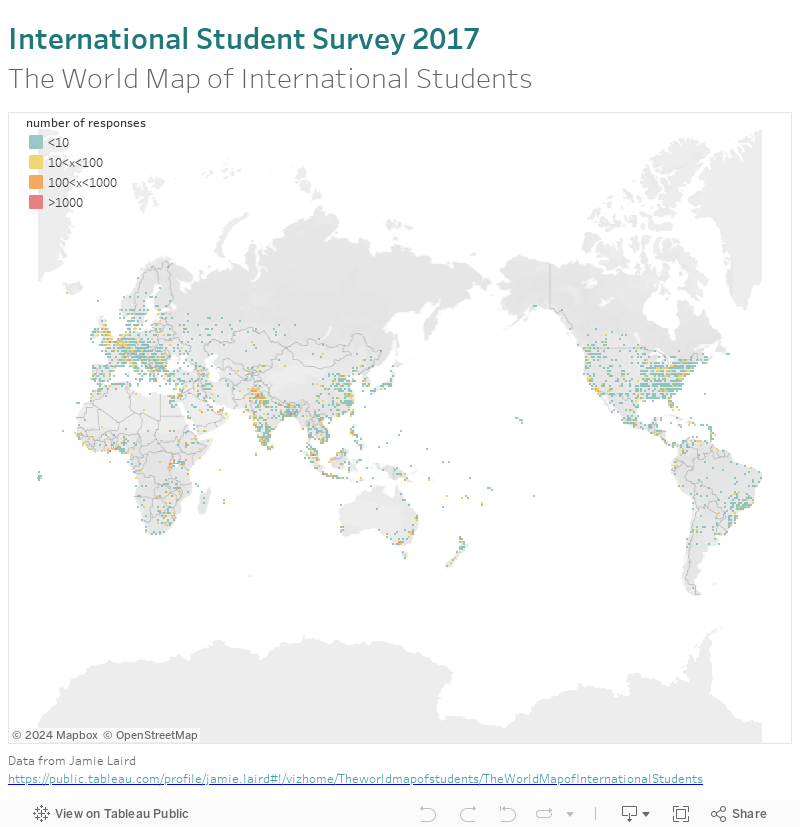
Makeover Sunday II

This time I'm using a dataset from Jamie Laird, original workbook on Tableau Public . Having worked in remote sensing before, I like the idea of a map as pixels of so many kilometres by so many kilometres, or so many degrees by so many degrees latitude and longitude. This dataset behaves well with Tableau's default Mercator projection(only projection using built in maps) . If you have data closer to the poles you might want to force a geographic projection by using your own map background image.

As always, a couple of calculated fields come handy.
Truncated Latitude and Longitude:
int([Latitude])
int([Longitude]) 
Aggregate the number of responses and force a logarithmic colour scale, with appropriate legend:
case int(log(COUNTD([Response ID])))
when 0 then '<10'
when 1 then '10<x<100'
when 2 then '100<x<1000'
when 3 then '>1000'
end
Some footnotes on presentation: make sure you have no border or halo on the marks (controlled through colour), and if you really want to treat the marks as individual pixels use the square mark type.

Sunday, 5 February 2017

Blending MEP data to UK regions map

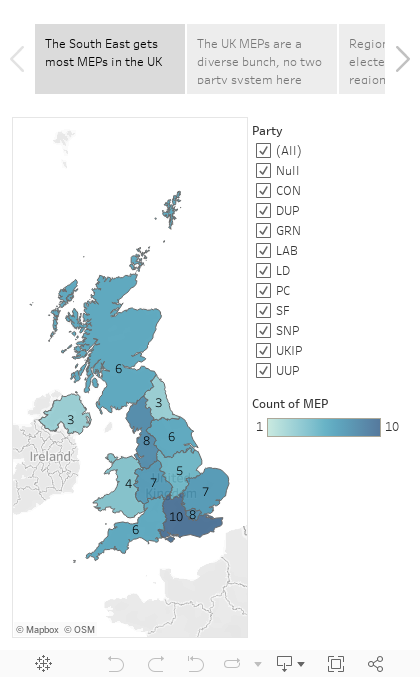
This part 3 of my MEP analysis: after presenting the Tableau visualisation and discussing the creation of the map, I look into using the list of all UK MEPs as a secondary datasource blended with the map.
Counting the MEPs per English region is the easier case. Region is the linking field, and we can filter on a field from the secondary source (Party) with no problem, as we are using a simple aggregation, the count (CNT). For Scotland etc. the added complication is having to link on the devolved administration which we throw into the level of detail of the relevant 'Latitude (generated)' mark.


I mentioned that the count is a simple aggregation, other similar aggregations that 'tolerate' filters from secondary sources are SUM and AVG. Things get trickier when trying to look at parties, as we have to use the distinct count. We only want to count a party once in each region it occurs in, not once for every MEP.

So how do we filter, e.g. for regional vs. UK wide parties? This is a classic case were a parameter is necessary. We right click at the bottom left, choose 'Create Parameter' and give the options we want in the menu:
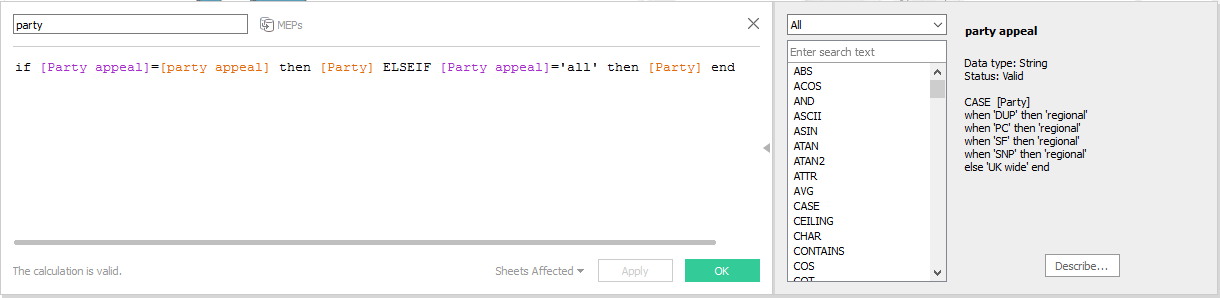
Then we also create a (lower case) party calculated field driven by the parameter and we use the distinct count of this calculated field for the label and the colour:
This deals with one major issue with using secondary sources. Now let's consider another one. We've grouped our parties by regional and UK wide appeal, and we don't want to filter, but we want the tooltip to tell us what party appeal MEPs a region has as we hover over the map with the mouse. Tableau likes to aggregate anything coming from the secondary source along the linking dimensions, so it will aggregate the appeal of parties of each region, and the default aggregation for a string is ATTR(). This is perfectly fine in England where no regional parties get elected, it will return 'UK wide'. But what about the devolved administrations where regional and UK wide parties are both represented? There's a dirty hack, and as usual it involves a calculated field.

min([party appeal])+(if max([party appeal])!=min([party appeal]) then ' & '+MAX([party appeal]) else '' end)
MIN and MAX on strings is fine when there are only two options like in this case, so now instead of the hated '*' our devolved regions return 'UK wide & regional'. If we were dealing with a string field that had more than two values, MIN and MAX could still be useful to return an 'a-z' type range, if applicable. If it gets too complicated, maybe a blend is seriously limiting the analysis and another approach should be followed.

Wednesday, 1 February 2017

Mapping the UK regions

For a more up to date and simpler approach see a later post using NUTS geographic role. Both grouping filled map areas and dual axis maps are very worthwhile techniques so I feel this tutorial is still useful.

In this post I'll guide you through making the maps used in the visualisation of UK MEPs I published last time.

For our raw data we turn to wikipedia's Regions of England. Following the link for each region we go to the 'Local government' part, where we copy the table into Excel.
 Tableau knows the 'County/Unitary' field, once you clean it up a bit and give it county as the geographic role. This is with the exception of the starred fields above (e.g. Greater Manchester and Merseyside) where tableau knows the metropolitan boroughs, not the metropolitan country, so you have to break it to separate rows for each borough. In tableau you then will get the map below:
Group the unitary authorities/counties/boroughs to regions, and use that in place of the county in level of detail. This gives us the maps of England, but what about Scotland, Wales and Northern Ireland?

You could go and find all the counties etc. there, but there is a much simpler way. Add Scotland, Wales and Northern Ireland rows with the names in the same field as the names of english counties. Then duplicate the field in Tableau and this time change geographic role to State/Province. Then drag Longitude (generated) next to the already existing Longitude (generated) for columns, and change the level of detail of the map to this State/Province field. You should get two maps next to each other:
Now all you need to do is click on the Longitude and select dual axis and voila! a map with the UK regions. Don't worry too much about the 121 unknown, it should be all the counties/authorities/boroughs that didn't match 'England' and are not shown on the map on the left, plus the 3 States/Provinces that didn't match a county name and are not shown on the map to the right. As long as you have no gaps in the dual axis map you should be fine.

The dual axis does cause a number of weird behaviours. E.g. right click on the sheet, select 'Duplicate as Crosstab' and you get two new sheets, one crosstab for each map. So for some applications you might want to avoid dual axis, and list all the counties of Wales, Scotland and Northern Ireland instead.

Sunday, 29 January 2017

Mapping the UK's members of the European parliament

How to tutorials on mapping UK regions and blending MEP data to UK regions map.

After a bit of copy paste from online sources, I created a list of UK MEPs, and a list of local authorities in England as well as the 3 devolved administrations of Scotland, Wales and Northern Ireland, which I used for the visualisation below. I will revisit this in future posts for a detailed 'how to'. For the moment I'd like to draw your attention to the fact that any statistics here are based on the number of elected MEPs of each party in each region, and not the actual votes counted.

 I devise a numerical scale to map parties left to right, which is by its very nature arbitrary, and specific to the time (2014) and place (i.e. a UK definition of centre right can be quite different from a French one). I thought it was fair enough to put Lib Dems in the centre after their coalition time, and Labour and Conservatives (including the Ulster Unionists) on either side, with UKIP further right, the regional parties and greens on the left, and the two main parties of Northern Ireland defining far left and far right. Averaging this numerical value of the MEPs of a particular region is used to place it on the Left-Right spectrum, though a closer look at similar scoring regions shows vast differences that can be summarised by the same statistics!